 IoT
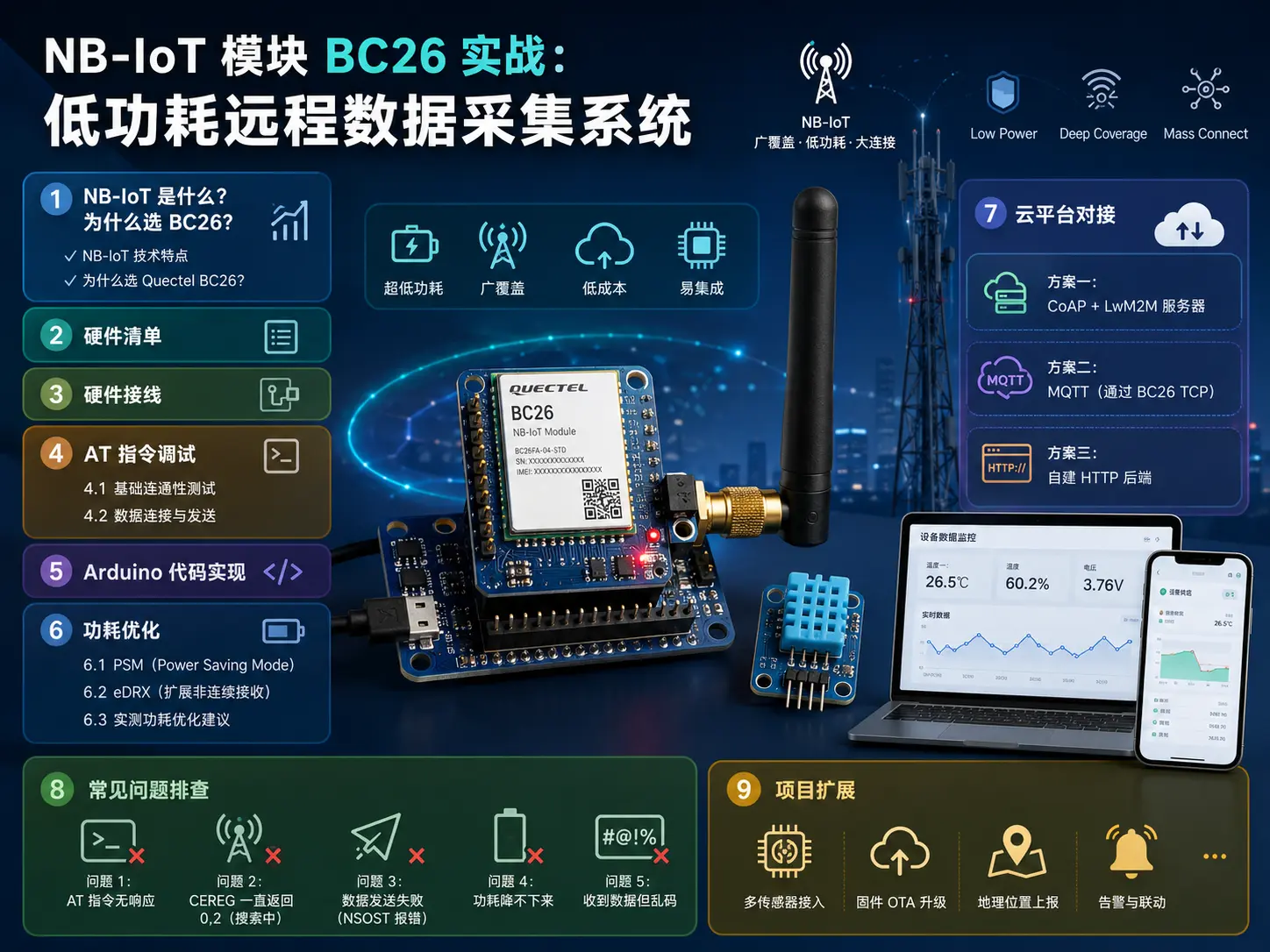
IoT NB-IoT Module BC26 in Practice: Low-Power Remote Data Collection System
Introduction
If you need to do remote data collection, WiFi and Bluetooth can’t cover it, and LoRa requires you to build your own gateway, then NB-IoT might be the most hassle-free solution. The operator’s base station provides direct coverage, just insert a SIM card to access the internet, and the standby power consumption is ridiculously low.
Today we will use the Quectel BC26 module to build a low-power remote data collection node from scratch. The article will cover hardware selection, wiring, AT command debugging, power consumption optimization, and the complete process of pushing data to the cloud platform.
1. What is NB-IoT? Why Choose BC26?
NB-IoT Technical Features
NB-IoT (Narrowband Internet of Things) is an LPWA (Low Power Wide Area) technology defined by the 3GPP standard, working on licensed frequency bands. It has these core advantages:
- Wide Coverage: Directly reuses operator 4G base stations, no need to build your own gateway
- Low Power Consumption: Standby current in PSM mode is only a few microamps (μA)
- Low Cost: Module price is 30-50 yuan, SIM card package costs a few yuan per month
- High Connection Density: A single base station can support 100,000+ devices
Why Choose Quectel BC26?
BC26 is an NB-IoT module launched by Quectel, one of the most mainstream models on the market:
| Parameter | BC26 |
|---|---|
| Frequency Bands | B1/B3/B5/B8/B28/B34/B38/B39/B40/B41 |
| Communication Interface | UART (AT commands) |
| Operating Voltage | 3.3V |
| Standby Current (PSM) | ~3.5 μA |
| Transmit Current | ~200 mA (peak) |
| Package | LCC |
| Price | About 35 yuan |
BC26 also has an upgraded version BC260Y (pin-compatible, supports more frequency bands), but BC26 is already sufficient. If you’re using it in China, confirm the operator frequency band matches - China Telecom B5/B8, China Mobile B3/B5/B8, China Unicom B1/B3/B8.
2. Hardware List
| Component | Model/Specification | Quantity | Reference Price |
|---|---|---|---|
| NB-IoT Module | Quectel BC26 | 1 | ¥35 |
| Main Controller | Arduino Nano / ESP32 development board | 1 | ¥15-30 |
| NB-IoT Base Board | BC26 breakout board (with antenna socket) | 1 | ¥20 |
| NB-IoT Antenna | PCB antenna or external antenna | 1 | ¥10 |
| SIM Card | Telecom/Mobile/Unicom NB-IoT dedicated card | 1 | ¥5/month |
| Temperature/Humidity Sensor | DHT22 / SHT30 | 1 | ¥10-25 |
| Voltage Sensor | INA219 | 1 | ¥8 |
| Jumper Wires | Female-to-female, Male-to-female | Several | ¥5 |
| Breadboard | 830 holes | 1 | ¥5 |
| Lithium Battery (optional) | 18650 + TP4056 | 1 | ¥15 |
Total cost approximately 110-160 yuan, more than half cheaper than 4G solutions.
3. Hardware Wiring
The BC26 module communicates with Arduino through UART, wiring is very simple:
Arduino Nano          BC26 Breakout
============          =============
3.3V       ---------> VCC (Note! Must be 3.3V)
GND        ---------> GND
D2 (RX)    ---------> TX
D3 (TX)    ---------> RX
           (Power ground and signal ground shared)
⚠️ Critical Note: BC26 operating voltage is 3.3V, absolutely cannot connect 5V! Arduino Nano’s UART TX output is 5V level, needs level shifting through a level shifter chip (such as TXB0104) or series 1kΩ resistor for voltage reduction. A better approach is to use ESP32 (native 3.3V GPIO).
Sensor connections:
- DHT22: VCC→3.3V, GND→GND, DATA→D4
- INA219: VCC→3.3V, GND→GND, SDA→A4, SCL→A5
4. AT Command Debugging
BC26 is controlled through AT commands. First power up the module, connect with a serial debugging tool (baud rate 115200), and test commands one by one.
4.1 Basic Connectivity Test
// Test if module responds normally
AT
OK

// Query module model
ATI
Quectel
BC26
Revision: BC26JAR02A07
OK

// Query SIM card status
AT+CPIN?
+CPIN: READY
OK

// Query operator registration status
AT+CEREG?
+CEREG: 0,1    // 1 = Registered to local network
OK

// Query signal strength
AT+CSQ
+CSQ: 15,99    // 15 = RSSI about -85dBm, good signal
OK
If CEREG returns 0,2 it means searching for network, 0,3 means registration rejected. Need to check:
- Whether SIM card has NB-IoT function activated
- Whether there is NB-IoT coverage locally
- Whether antenna is connected properly
4.2 Data Connection and Sending
BC26 supports multiple data transmission methods, we use the simplest UDP Socket:
// Set APN (fill in according to operator)
AT+CGDCONT=1,"IP","ctnet"   // China Telecom
// or
AT+CGDCONT=1,"IP","cmnbiot"  // China Mobile

// Activate PDP context
AT+CGACT=1,1
OK

// Query IP address
AT+CGPADDR=1
+CGPADDR: 1,"10.174.xx.xx"
OK

// Create UDP Socket
AT+NSOCR=DGRAM,17,0,1
0    // Socket number = 0
OK

// Send data to server (IP + Port)
AT+NSOST=0,"120.78.xxx.xxx",5683,10,0102030405060708090A
+NSOST: 0,10,10    // Socket 0, requested 10 bytes, sent 10 bytes
OK
In actual projects, the recommended data format is CoAP + LwM2M protocol, which is the most commonly used IoT protocol for NB-IoT, designed specifically for low-bandwidth scenarios.
5. Arduino Code Implementation
We use the SoftwareSerial library to communicate with BC26, collect sensor data and send it to the server via UDP.
#include <SoftwareSerial.h>
#include <SimpleDHT.h>
#include <Wire.h>
#include <Adafruit_INA219.h>

// BC26 serial
SoftwareSerial bc26Serial(2, 3); // RX, TX

// Sensors
SimpleDHT22 dht22(4);
Adafruit_INA219 ina219;

// Server configuration (replace with your own)
const char* SERVER_IP = "120.78.xxx.xxx";
const int SERVER_PORT = 5683;

// Socket number
int socketId = -1;

void setup() {
  Serial.begin(115200);
  bc26Serial.begin(115200);

  // Initialize sensors
  ina219.begin();
  ina219.setCalibration_32V_2A();

  delay(3000);  // Wait for BC26 to power up

  Serial.println("=== BC26 NB-IoT Data Collection Node ===");

  // 1. Check module
  sendAT("AT", 1000);

  // 2. Check SIM
  sendAT("AT+CPIN?", 1000);

  // 3. Check network registration
  sendAT("AT+CEREG?", 1000);

  // 4. Check signal
  sendAT("AT+CSQ", 1000);

  // 5. Set APN
  sendAT("AT+CGDCONT=1,\"IP\",\"ctnet\"", 2000);

  // 6. Activate PDP
  sendAT("AT+CGACT=1,1", 5000);

  // 7. Create UDP Socket
  String resp = sendAT("AT+NSOCR=DGRAM,17,0,1", 2000);
  // Parse returned socket ID
  socketId = 0;  // Usually returns 0

  Serial.println("Initialization complete, starting collection...");
}

void loop() {
  // Read sensor data
  float temperature, humidity;
  int err = dht22.read2(&temperature, &humidity, NULL);
  if (err != SimpleDHTErrSuccess) {
    Serial.println("DHT22 read failed");
  }

  float busVoltage = ina219.getBusVoltage_V();
  float current_mA = ina219.getCurrent_mA();
  float power_mW = ina219.getPower_mW();

  // Build data packet (simplified JSON)
  String data = String("{") +
    "\"t\":" + String(temperature, 1) + "," +
    "\"h\":" + String(humidity, 1) + "," +
    "\"v\":" + String(busVoltage, 2) + "," +
    "\"i\":" + String(current_mA, 0) +
    "}";

  Serial.println("Data: " + data);

  // Send via NB-IoT
  sendNBIoTData(data);

  // Low power: collect once every 15 minutes
  delay(15 * 60 * 1000);
}

// Send AT command and return response
String sendAT(String cmd, int timeout) {
  Serial.println(">> " + cmd);
  bc26Serial.println(cmd);

  String response = "";
  unsigned long start = millis();

  while (millis() - start < timeout) {
    while (bc26Serial.available()) {
      char c = bc26Serial.read();
      response += c;
    }
  }

  Serial.println("<< " + response);
  return response;
}

// Send data through BC26
void sendNBIoTData(String data) {
  String hexData = stringToHex(data);
  String cmd = String("AT+NSOST=") +
    String(socketId) + "," +
    "\"" + SERVER_IP + "\"," +
    String(SERVER_PORT) + "," +
    String(data.length()) + "," +
    hexData;

  String resp = sendAT(cmd, 5000);

  if (resp.indexOf("+NSOST") >= 0) {
    Serial.println("Data sent successfully");
  } else {
    Serial.println("Send failed, reconnecting...");
    reconnect();
  }
}

// String to hexadecimal
String stringToHex(String str) {
  String hex = "";
  for (int i = 0; i < str.length(); i++) {
    hex += String(str.charAt(i), HEX);
  }
  hex.toUpperCase();
  return hex;
}

// Reconnection logic
void reconnect() {
  Serial.println("Attempting to reconnect...");
  sendAT("AT+CGACT=0,1", 2000);
  delay(1000);
  sendAT("AT+CGACT=1,1", 5000);
}
6. Power Consumption Optimization
The biggest advantage of NB-IoT is low power consumption. BC26 supports two power-saving modes:
6.1 PSM (Power Saving Mode)
In PSM mode, the module enters deep sleep, standby current is only ~3.5 μA. After waking up, it needs to re-attach to the network.
// Enable PSM, Active Time=0 (sleep immediately after sending),
// T3324=300 second periodic wake-up
AT+CPSMS=1,,,"00000000","01000101"
OK
Power Consumption Comparison:
| Mode | Current | Description |
|---|---|---|
| Connected | ~200 mA | When sending data |
| Idle mode | ~5 mA | Maintaining network attachment |
| PSM mode | ~3.5 μA | Deep sleep |
Using a 2000 mAh lithium battery, if waking up to send data once per hour (5 seconds connected each time), theoretical battery life is over 6 months.
6.2 eDRX (Extended Discontinuous Reception)
In eDRX mode, the device maintains network attachment but periodically turns off reception. Suitable for scenarios requiring quick response:
// Enable eDRX, period 20.48 seconds
AT+CEDRXS=1,5,"0101"
OK
6.3 Actual Power Consumption Optimization Suggestions
- Reduce data collection frequency: Change from once per minute to once every 15 minutes, power consumption reduced 15 times
- Turn off unnecessary AT queries: Only query signal and registration status once per power-on
- Use PSM + timed wake-up: Sensor + main controller use timer interrupt to wake BC26
- Shorten send window: Package data as small as possible, return to PSM immediately after one send
- Main controller also sleeps: Arduino uses
LowPowerlibrary to enter Power Down mode (~10 μA)
7. Cloud Platform Integration
After data is sent to the server, the following solutions are recommended for storage and visualization:
Solution 1: CoAP + LwM2M Server
Leshan is an open-source LwM2M server, natively supported by BC26:
// Connect to Leshan server
AT+QLWUL="coap://leshan.eclipseprojects.io:5683"
Solution 2: MQTT (via BC26 TCP)
// Create TCP Socket
AT+NSOCR=STREAM,6,0,1
0
OK

// Connect to MQTT Broker
AT+NSOCO=0,"broker.hivemq.com",1883
OK

// Send MQTT data packet (requires manual packaging or library support)
Solution 3: Self-built HTTP Backend
UDP data sent to your server, Node.js receives and writes to InfluxDB, then visualizes with Grafana. We will discuss this solution in detail in article 060.
8. Common Problem Troubleshooting
Problem 1: AT Commands No Response
- Check wiring: TX↔RX cross-connected, don’t connect TX to TX
- Confirm baud rate: BC26 default is 115200, query with
AT+IPR? - Check power supply: BC26 needs 3.3V, peak current 200mA, USB power may not be enough, add capacitor
Problem 2: CEREG Always Returns 0,2 (Searching)
- SIM card hasn’t activated NB-IoT function → Contact operator to activate
- No NB-IoT coverage locally → Change operator or change location to test
- Antenna not connected or wrong direction → Connect antenna properly, signal attenuation is severe inside metal enclosures
Problem 3: Data Send Failed (NSOST Error)
- PDP not activated → First execute
AT+CGACT=1,1 - Firewall blocking → Confirm server port is open, some NB-IoT operators restrict specific ports
- Signal too poor → Check signal with
AT+CSQ, RSSI < -110dBm basically cannot communicate
Problem 4: Power Consumption Won’t Go Down
- Confirm PSM is enabled:
AT+CPSMS? - Check if there is background data keeping connection active
- Check if main controller is also sleeping
Problem 5: Received Data is Garbled
- Confirm Hex encoding is correct: BC26’s NSOST requires hexadecimal format
- Check byte order and encoding format (UTF-8 vs ASCII)
9. Project Extensions
Based on this data collection node, you can continue to do:
- Multi-sensor expansion: Add soil moisture, light, PM2.5 and other sensors
- Edge alerts: Set thresholds on Arduino side, only wake BC26 to send alerts when exceeded
- Solar power: Add solar panel and charge controller, achieve permanent online
- Multi-node networking: Multiple collection points share one BC26, reduce single node cost
- Integrate with smart home: Push collected data to Home Assistant
Summary
The core advantage of the NB-IoT BC26 solution can be summarized in three words: hassle-free. No need to build a gateway, just insert a SIM card to connect to the internet, power consumption is so low it can run on battery for half a year. Suitable for scattered deployment, unattended scenarios like farmland monitoring, water quality monitoring, and equipment inspection.
If you have large-scale deployment needs (hundreds or thousands of nodes), it is recommended to use LwM2M protocol for device management; if it’s a personal project, simple UDP + self-built server is enough.
Give it a try, welcome to discuss in the comments if you have questions!