 Embedded Development
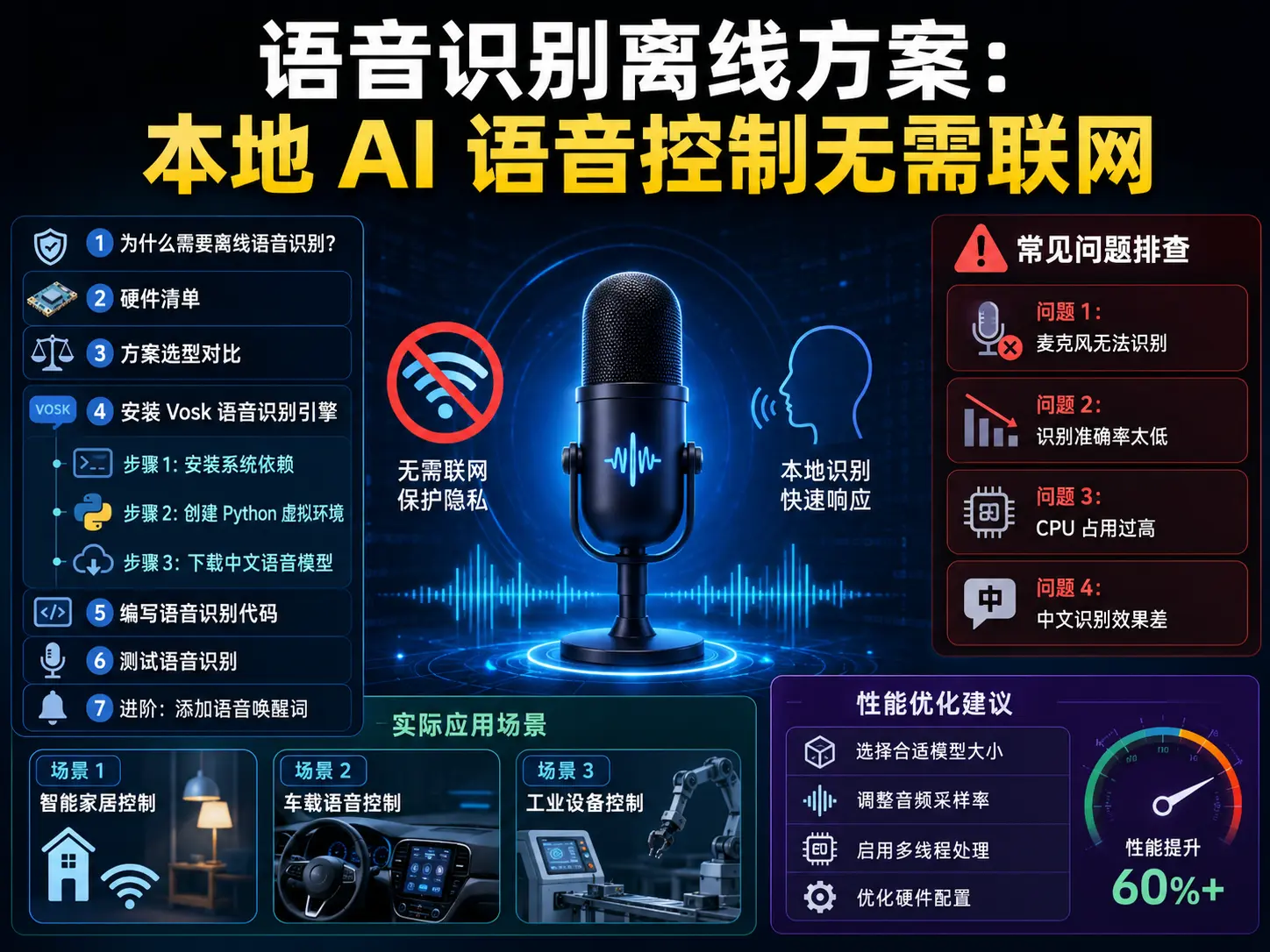
 Offline Voice Recognition Solution: Local AI Voice Control Without Internet
Why Do We Need Offline Voice Recognition?
When it comes to voice control, many people’s first thought is Xiao Ai, Tmall Genie, or Google Assistant. These solutions are indeed convenient, but they have a fatal flaw: all voice data must be uploaded to the cloud.
What does this mean?
-
Your conversation content may be recorded and analyzed
-
Completely paralyzed without internet
-
Response speed affected by network latency
-
Privacy leak risk always exists
For smart home, industrial control, or any privacy-involved scenarios, offline voice recognition is the correct solution. Today we’ll build a completely local voice recognition system, no internet required, data never leaves device, millisecond-level response.
Hardware List
| Device | Model | Price | Notes |
|---|---|---|---|
| Development board | Raspberry Pi 4B 4GB | ¥350 | Or any Linux device |
| Microphone | USB microphone array | ¥80 | 4-mic works better |
| Speaker | 3W small speaker | ¥20 | For voice feedback |
| Storage | 32GB TF card | ¥40 | System + model storage |
Total cost: about ¥490
If you already have a Raspberry Pi or Jetson Nano, cost can be controlled under ¥100 (just need to buy microphone).
Solution Selection Comparison
Currently mainstream offline speech recognition engines include:
| Engine | Model Size | Recognition Speed | Chinese Support | Resource Usage |
|---|---|---|---|---|
| Vosk | 40-200MB | Real-time | Excellent | Low |
| Sherpa-ONNX | 50-300MB | Real-time | Excellent | Medium |
| PocketSphinx | 20MB | Real-time | Average | Very low |
| Kaldi | 500MB+ | Slower | Good | High |
Recommended choice: Vosk
Reasons:
-
Small model (Chinese model about 50MB)
-
High recognition accuracy (95%+ for daily speech)
-
Supports Python, C++, Node.js and other languages
-
Active community, complete documentation
-
Completely open source and free
Install Vosk Speech Recognition Engine
Step 1: Install System Dependencies
# Update system
sudo apt update && sudo apt upgrade -y

# Install audio processing dependencies
sudo apt install -y python3-pip python3-venv \
    libatlas-base3 portaudio19-dev \
    python3-pyaudio ffmpeg
Step 2: Create Python Virtual Environment
# Create project directory
mkdir -p ~/voice-control && cd ~/voice-control

# Create virtual environment
python3 -m venv .venv
source .venv/bin/activate

# Install Vosk and audio libraries
pip install vosk pyaudio wave numpy
Step 3: Download Chinese Speech Model
Vosk provides Chinese models of various sizes, choose based on device performance:
# Download small model (40MB, suitable for embedded devices)
wget https://alphacephei.com/vosk/models/vosk-model-small-cn-0.22.zip
unzip vosk-model-small-cn-0.22.zip
mv vosk-model-small-cn-0.22 model

# Or download large model (200MB, higher accuracy)
# wget https://alphacephei.com/vosk/models/vosk-model-cn-0.22.zip
# unzip vosk-model-cn-0.22.zip
# mv vosk-model-cn-0.22 model
Write Speech Recognition Code
Create a basic speech recognition script voice_recognize.py:
#!/usr/bin/env python3
# -*- coding: utf-8 -*-

import sys
import os
import wave
import json
import pyaudio
from vosk import Model, KaldiRecognizer

# Configuration parameters
SAMPLE_RATE = 16000
MODEL_PATH = "model"
COMMANDS = {
    "turn on light": "light_on",
    "turn off light": "light_off",
    "turn on air conditioner": "ac_on",
    "turn off air conditioner": "ac_off",
    "set temperature to 25 degrees": "ac_temp_25",
    "play music": "music_play",
    "pause": "music_pause",
    "next song": "music_next",
}

def load_model():
    """Load speech model"""
    if not os.path.exists(MODEL_PATH):
        print(f"Model does not exist: {MODEL_PATH}")
        print("Please download model first: wget https://alphacephei.com/vosk/models/vosk-model-small-cn-0.22.zip")
        sys.exit(1)

    return Model(MODEL_PATH)

def recognize_speech(recognizer, stream):
    """Real-time speech recognition"""
    print("🎤 Start listening... (say 'exit' to end)")

    while True:
        data = stream.read(4000, exception_on_overflow=False)

        if len(data) == 0:
            break

        if recognizer.AcceptWaveform(data):
            result = json.loads(recognizer.Result())
            text = result.get("text", "").strip()

            if text:
                print(f"🗣️  Recognition result: {text}")

                # Check if it's a command
                if text in COMMANDS:
                    action = COMMANDS[text]
                    print(f"✅ Execute command: {action}")
                    execute_command(action)
                elif text == "exit":
                    print("👋 Exit voice recognition")
                    break
                else:
                    print(f"⚠️  Unrecognized command: {text}")

def execute_command(action):
    """Execute control command"""
    # Can interface with actual hardware control here
    print(f"   → Execute: {action}")

    # Example: Control GPIO
    # if action == "light_on":
    #     GPIO.output(LED_PIN, GPIO.HIGH)

def main():
    # Load model
    print("📦 Loading speech model...")
    model = load_model()

    # Initialize recognizer
    recognizer = KaldiRecognizer(model, SAMPLE_RATE)

    # Initialize audio input
    p = pyaudio.PyAudio()
    stream = p.open(
        format=pyaudio.paInt16,
        channels=1,
        rate=SAMPLE_RATE,
        input=True,
        frames_per_buffer=4000
    )

    try:
        recognize_speech(recognizer, stream)
    except KeyboardInterrupt:
        print("\n🛑 User interrupted")
    finally:
        stream.stop_stream()
        stream.close()
        p.terminate()

if __name__ == "__main__":
    main()
Test Speech Recognition
Run script to test:
# Activate virtual environment
source .venv/bin/activate

# Run recognition
python voice_recognize.py
Test process:
-
Run script, wait for “Start listening” prompt: Script will load model and open microphone, output
🎤 Start listening...indicates ready. -
Clearly speak command words: Speak commands defined in COMMANDS into microphone, like “turn on light”, “turn off light”, “turn on air conditioner”. Script will output recognition results in real-time.
-
Observe command execution: If recognition is correct, will display
✅ Execute command: xxx; if recognition is wrong, will display⚠️ Unrecognized command, can retry or adjust pronunciation. -
Say “exit” to end recognition: Script has built-in exit command, say “exit” to normally end program and release audio device.
Recognition effect example:
📦 Loading speech model...
🎤 Start listening... (say 'exit' to end)
🗣️  Recognition result: turn on light
✅ Execute command: light_on
   → Execute: light_on
🗣️  Recognition result: turn on air conditioner
✅ Execute command: ac_on
   → Execute: ac_on
🗣️  exit
👋 Exit voice recognition
Advanced: Add Voice Wake Word
Continuous listening consumes a lot of CPU, more elegant way is to use wake word (like “Xiao Ai”).
Install Porcupine wake word engine:
pip install pvporcupineCreate script with wake word wake_word_voice.py:
#!/usr/bin/env python3
# -*- coding: utf-8 -*-

import pyaudio
import vosk
import pvporcupine
import struct
import json

# Configuration
SAMPLE_RATE = 16000
WAKE_WORD = "hey google"  # Available: alexa, hey google, hey siri, etc.

def create_wake_word_engine():
    """Create wake word detection engine"""
    porcupine = pvporcupine.create(
        keywords=[WAKE_WORD],
        sensitivities=[0.5]
    )
    return porcupine

def main():
    # Initialize wake word engine
    porcupine = create_wake_word_engine()

    # Initialize audio
    p = pyaudio.PyAudio()
    stream = p.open(
        rate=porcupine.sample_rate,
        channels=1,
        format=pyaudio.paInt16,
        input=True,
        frames_per_buffer=porcupine.frame_length
    )

    print(f"🎤 Waiting for wake word: '{WAKE_WORD}'")

    try:
        while True:
            pcm = stream.read(porcupine.frame_length, exception_on_overflow=False)
            pcm = struct.unpack_from("h" * porcupine.frame_length, pcm)

            keyword_index = porcupine.process(pcm)

            if keyword_index >= 0:
                print(f"✅ Wake word detected! Start speech recognition...")
                # Can switch to Vosk for full speech recognition here
                # Simplified example, just print prompt
                print("   (Connect Vosk recognition logic here)")

    except KeyboardInterrupt:
        print("\n🛑 Exit")
    finally:
        stream.close()
        p.terminate()
        porcupine.delete()

if __name__ == "__main__":
    main()
Common Problem Troubleshooting
Problem 1: Microphone Cannot Be Recognized
Symptom: Running script reports error Input device not found
Solution:
# View available audio devices
arecord -l

# Test microphone recording
arecord -d 5 -f cd test.wav
aplay test.wav

# If device ID is not 0, modify input_device_index in code
stream = p.open(
    input_device_index=1,  # Change to actual device ID
    ...
)
Problem 2: Recognition Accuracy Too Low
Possible causes:
-
Environment noise too large
-
Microphone distance too far
-
Model too small
Solutions:
-
Reduce environment noise: Turn off fans, air conditioners and other noise sources, or add sound insulation cotton around microphone. Recognition rate in noisy environment may drop from 95% to below 60%.
-
Bring microphone closer: Microphone distance 30-50cm from mouth works best. Using USB microphone array (4-mic or 6-mic) works much better than single mic.
-
Switch to large model: Small model (40MB) suitable for embedded devices, but accuracy not as good as large model (200MB). Switching to
vosk-model-cn-0.22can improve accuracy by 5-10%. -
Adjust speech input: Slow down speech speed, articulate clearly, avoid dialect accents. Vosk recognizes Mandarin best, dialect support requires additional training.
Problem 3: CPU Usage Too High
Optimization solutions:
# Reduce sampling rate (from 16000 to 8000)
SAMPLE_RATE = 8000

# Increase recognition frame size (from 4000 to 8000)
data = stream.read(8000)

# Or use small model
# vosk-model-small-cn-0.22 is 30% faster than large model
Problem 4: Chinese Recognition Effect Poor
Checklist:
-
Confirm downloaded Chinese model (filename contains
cn) -
Speaking speed not too fast
-
Clear pronunciation, avoid dialects
-
Try testing in quiet environment
Practical Application Scenarios
Scenario 1: Smart Home Control
# Interface with Home Assistant
import requests

def execute_command(action):
    if action == "light_on":
        requests.post("http://homeassistant.local/api/services/light/turn_on",
                     headers={"Authorization": "Bearer YOUR_TOKEN"})
Scenario 2: In-Vehicle Voice Control
# Read vehicle speed via OBD-II
def execute_command(action):
    if action == "show vehicle speed":
        speed = obd.read_speed()
        speak(f"Current speed {speed} kilometers per hour")
Scenario 3: Industrial Equipment Control
# Control relay via Modbus
def execute_command(action):
    if action == "start motor":
        modbus.write_register(1, 0xFF00)
Performance Optimization Suggestions
| Optimization Item | Effect | Implementation Difficulty |
|---|---|---|
| Use small model | CPU reduced 30% | ⭐ |
| Reduce sampling rate | CPU reduced 20% | ⭐ |
| Add wake word | Standby power reduced 80% | ⭐⭐ |
| Use NPU acceleration | Speed improved 3x | ⭐⭐⭐ |
Summary
Core advantages of offline speech recognition:
✅ Privacy security - Data never leaves device ✅ Fast response - No network latency ✅ Stable and reliable - Works even when offline ✅ Low cost - No API fees
For IoT projects, Vosk is currently the most mature choice. 50MB model, 95% recognition rate, completely offline operation, sufficient to meet most scenario needs.
Next steps to explore:
-
Train custom vocabulary (improve professional term recognition rate)
-
Integrate TTS speech synthesis (achieve two-way dialogue)
-
Deploy to smaller devices (ESP32-S3, etc.)
Hope this blog post is helpful to you!