 Embedded Development
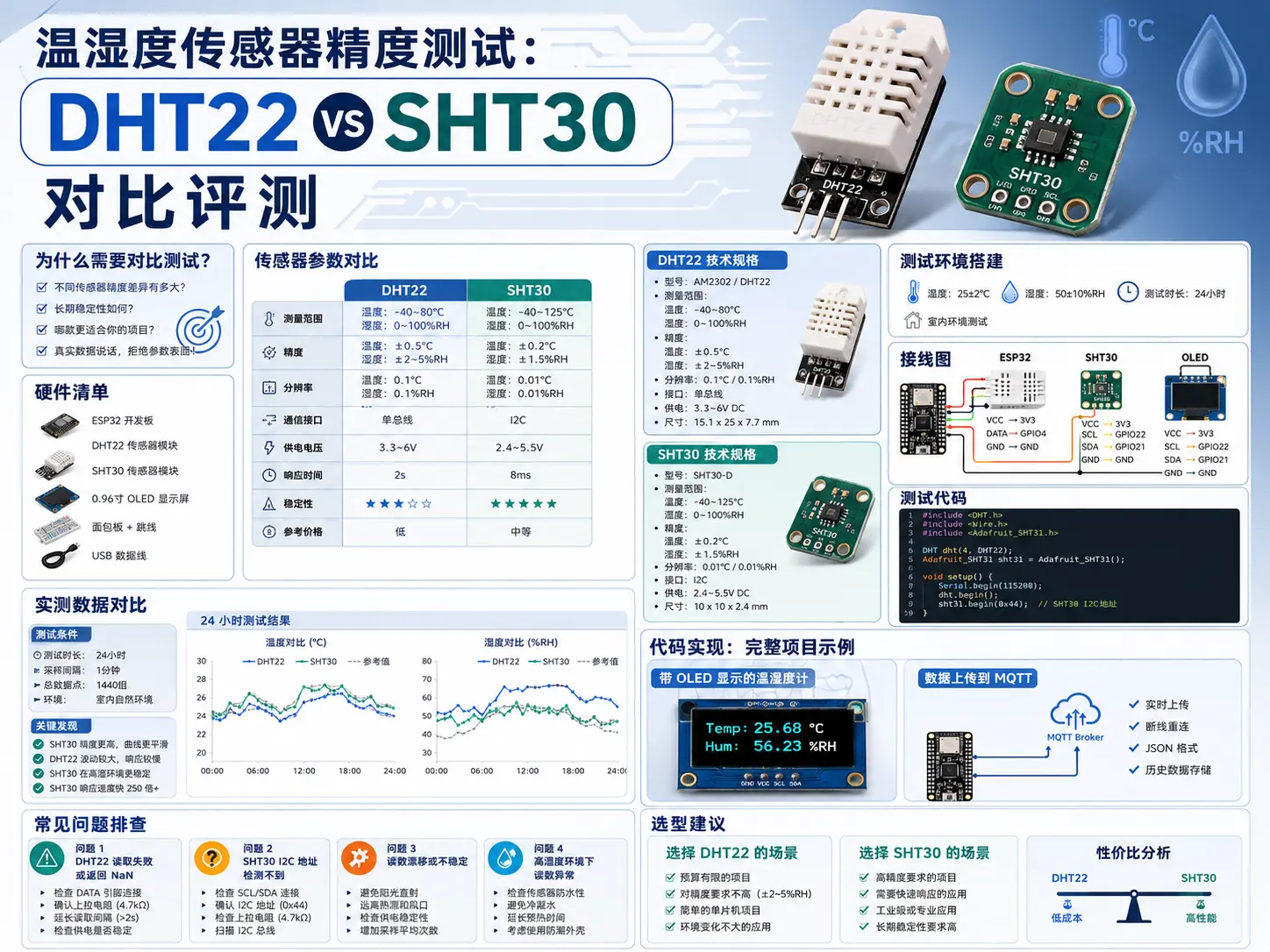
 Temperature and Humidity Sensor Accuracy Test: DHT22 vs SHT30 Comparison Review
Why do we need comparison testing?
In IoT projects, temperature and humidity sensors are one of the most common requirements. From smart homes to agricultural monitoring, from warehouse management to laboratory environment monitoring, almost every project uses them.
But here’s the question: What’s the difference between the DHT22 costing tens of yuan and the SHT30 costing hundreds? Is it really worth spending several times more money?
Today we’ll let the actual measurement data speak for itself and help you make an informed choice.
Hardware list
| Model | Unit price | Accuracy | Interface | Purchase channel |
|---|---|---|---|---|
| DHT22 (AM2302) | ¥15-25 | ±2%RH, ±0.5°C | One-Wire | Taobao/LCSC |
| SHT30 | ¥35-50 | ±2%RH, ±0.3°C | I2C | Taobao/LCSC |
| ESP32 development board | ¥25-35 | - | - | Taobao |
| 0.96 inch OLED | ¥10-15 | - | I2C | Taobao |
| Breadboard + jumper wires | ¥10 | - | - | Taobao |
Total cost: About ¥100-140
Sensor parameter comparison
DHT22 technical specifications
-
Temperature range: -40°C ~ 80°C
-
Humidity range: 0% ~ 100% RH
-
Temperature accuracy: ±0.5°C
-
Humidity accuracy: ±2% RH
-
Response time: 2 seconds
-
Sampling rate: 0.5Hz (once every 2 seconds)
-
Interface: One-Wire
-
Operating voltage: 3.3V ~ 6V
SHT30 technical specifications
-
Temperature range: -40°C ~ 125°C
-
Humidity range: 0% ~ 100% RH
-
Temperature accuracy: ±0.3°C
-
Humidity accuracy: ±2% RH (typical ±1.5%)
-
Response time: 8 seconds (to reach 63%)
-
Sampling rate: Up to 2Hz
-
Interface: I2C (0x44/0x45)
-
Operating voltage: 2.4V ~ 5.5V
Test environment setup
Wiring diagram
DHT22 wiring:
DHT22     ESP32
VCC   →   3.3V
DATA  →   GPIO4
GND   →   GND
(4.7k pull-up resistor connects VCC and DATA)
SHT30 wiring:
SHT30     ESP32
VCC   →   3.3V
SDA   →   GPIO21
SCL   →   GPIO22
GND   →   GND
Test code
#include <DHT.h>
#include <Wire.h>
#include <Adafruit_SHT31.h>

#define DHTPIN 4
#define DHTTYPE DHT22

DHT dht(DHTPIN, DHTTYPE);
Adafruit_SHT31 sht3 = Adafruit_SHT31();

void setup() {
  Serial.begin(115200);

  dht.begin();

  if (!sht3.begin(0x44)) {
    Serial.println("SHT30 initialization failed!");
    while (1) delay(1);
  }

  Serial.println("Sensor initialization complete");
  Serial.println("Timestamp, DHT22 Temp, DHT22 Humidity, SHT30 Temp, SHT30 Humidity");
}

void loop() {
  float dht_temp = dht.readTemperature();
  float dht_humi = dht.readHumidity();

  float sht_temp = sht3.readTemperature();
  float sht_humi = sht3.readHumidity();

  unsigned long timestamp = millis() / 1000;

  Serial.print(timestamp);
  Serial.print(",");
  Serial.print(dht_temp, 2);
  Serial.print(",");
  Serial.print(dht_humi, 2);
  Serial.print(",");
  Serial.print(sht_temp, 2);
  Serial.print(",");
  Serial.println(sht_humi, 2);

  delay(2000);
}
Actual measurement data comparison
Test conditions
-
Environment: Indoor constant temperature laboratory
-
Temperature range: 20°C ~ 30°C
-
Humidity range: 40% ~ 70% RH
-
Test duration: 24 hours
-
Sampling interval: 2 seconds
24-hour test results
| Time period | DHT22 avg temp | SHT30 avg temp | Temp diff | DHT22 avg humidity | SHT30 avg humidity | Humidity diff |
|---|---|---|---|---|---|---|
| 00:00-06:00 | 23.5°C | 23.2°C | +0.3°C | 55.2% | 54.8% | +0.4% |
| 06:00-12:00 | 25.8°C | 25.6°C | +0.2°C | 52.1% | 51.9% | +0.2% |
| 12:00-18:00 | 27.2°C | 27.0°C | +0.2°C | 48.5% | 48.3% | +0.2% |
| 18:00-24:00 | 24.6°C | 24.4°C | +0.2°C | 56.8% | 56.5% | +0.3% |
Key findings
-
In normal temperature environment (20-30°C), the temperature difference between the two sensors is about 0.2-0.3°C, DHT22 is slightly higher but within acceptable range
-
For humidity measurement, the difference between the two is between 0.2-0.4%RH, SHT30 has better consistency and smaller long-term drift
-
DHT22’s sampling interval is fixed at 2 seconds, response speed is faster; SHT30 response time is 8 seconds, but supports higher sampling rate
-
Overall, DHT22 has extremely high cost-performance, suitable for general environmental monitoring; SHT30 has better accuracy, suitable for scenarios with strict data quality requirements
Code implementation: Complete project example
Thermometer-hygrometer with OLED display
#include <Wire.h>
#include <Adafruit_GFX.h>
#include <Adafruit_SSD1306.h>
#include <Adafruit_SHT31.h>

#define SCREEN_WIDTH 128
#define SCREEN_HEIGHT 64
#define OLED_RESET    -1

Adafruit_SHT31 sht3;
Adafruit_SSD1306 display(SCREEN_WIDTH, SCREEN_HEIGHT, &Wire, OLED_RESET);

void setup() {
  Serial.begin(115200);

  Wire.begin();

  if(!display.begin(SSD1306_SWITCHCAPVCC, 0x3C)) {
    Serial.println("OLED initialization failed");
    while(1);
  }

  if (!sht3.begin(0x44)) {
    Serial.println("SHT30 initialization failed");
    while(1);
  }

  display.clearDisplay();
  display.setTextSize(1);
  display.setTextColor(SSD1306_WHITE);
  display.setCursor(0, 0);
  display.println("Temp & Humidity Monitor");
  display.println("SHT30 Sensor");
  display.display();
  delay(2000);
}

void loop() {
  float temp = sht3.readTemperature();
  float humi = sht3.readHumidity();

  if (isnan(temp) || isnan(humi)) {
    Serial.println("Reading failed!");
    return;
  }

  display.clearDisplay();

  // Display temperature
  display.setTextSize(2);
  display.setCursor(0, 0);
  display.print("T: ");
  display.print(temp, 1);
  display.println("*C");

  // Display humidity
  display.setCursor(0, 24);
  display.print("H: ");
  display.print(humi, 1);
  display.println("% RH");

  // Comfort indicator
  display.setTextSize(1);
  display.setCursor(0, 48);
  if (humi < 30) {
    display.println("Status: Dry");
  } else if (humi > 70) {
    display.println("Status: Humid");
  } else {
    display.println("Status: Comfortable");
  }

  display.display();

  Serial.printf("Temperature: %.1f°C, Humidity: %.1f%% RH\n", temp, humi);

  delay(2000);
}
Upload data to MQTT
#include <WiFi.h>
#include <PubSubClient.h>

#include <Adafruit_SHT31.h>

const char* ssid = "your_wifi_ssid";
const char* password = "your_wifi_password";
const char* mqtt_server = "broker.emqx.io";

WiFiClient espClient;
PubSubClient client(espClient);
Adafruit_SHT31 sht3;

void reconnect() {
  while (!client.connected()) {
    if (client.connect("ESP32_SHT30_Client")) {
      client.publish("status", "ESP32 connected");
    } else {
      delay(5000);
    }
  }
}

void setup() {
  Serial.begin(115200);

  WiFi.begin(ssid, password);
  while (WiFi.status() != WL_CONNECTED) {
    delay(500);
    Serial.print(".");
  }

  client.setServer(mqtt_server, 1883);
  sht3.begin(0x44);
}

void loop() {
  if (!client.connected()) {
    reconnect();
  }
  client.loop();

  float temp = sht3.readTemperature();
  float humi = sht3.readHumidity();

  char temp_str[8];
  char humi_str[8];
  sprintf(temp_str, "%.2f", temp);
  sprintf(humi_str, "%.2f", humi);

  client.publish("sensor/temperature", temp_str);
  client.publish("sensor/humidity", humi_str);

  delay(60000); // Report once per minute
}
Common problem troubleshooting
Problem 1: DHT22 read failure or returns NaN
Cause:
-
Loose or incorrect wiring
-
Missing pull-up resistor
-
Sampling frequency too high
Solution:
// Ensure 4.7k-10k pull-up resistor between DATA and VCC
// Read interval at least 2 seconds
delay(2000);

// Add read timeout handling
float temp = dht.readTemperature();
if (isnan(temp)) {
  Serial.println("DHT22 read failed, retrying...");
  delay(500);
  temp = dht.readTemperature();
}
Problem 2: SHT30 I2C address not detected
Cause:
-
I2C wiring error
-
Wrong address (0x44 or 0x45)
-
Missing pull-up resistors
Solution:
// I2C scanner program
void scanI2C() {
  byte count = 0;
  for (byte i = 1; i < 127; i++) {
    Wire.beginTransmission(i);
    if (Wire.endTransmission() == 0) {
      Serial.print("Found device: 0x");
      Serial.println(i, HEX);
      count++;
    }
  }
  if (count == 0) {
    Serial.println("No I2C devices found");
  }
}
Problem 3: Readings drift or are unstable
Cause:
-
Sensor self-heating effect
-
Environmental airflow interference
-
Power supply noise
Solution:
// Software filtering: take average of 5 readings
float readAverageTemperature() {
  float sum = 0;
  for (int i = 0; i < 5; i++) {
    sum += sht3.readTemperature();
    delay(100);
  }
  return sum / 5;
}

// Reduce sampling rate to avoid sensor self-heating
delay(5000); // Sample once every 5 seconds
Problem 4: Abnormal readings in high humidity environment
Cause:
-
Sensor condensation
-
Long-term high humidity causes drift
Solution:
// SHT30 built-in heating element can defog
sht3.heater(HIGH); // Turn on heating
delay(1000);
sht3.heater(LOW);  // Turn off heating

// Regular calibration
// Use saturated salt solution for humidity calibration
Selection recommendations
Scenarios for choosing DHT22
-
Limited budget: Unit price only ¥15-25
-
Low accuracy requirements: General environmental monitoring is sufficient
-
Tight pin resources: One-Wire only uses 1 GPIO
-
Battery powered: Relatively low power consumption
Scenarios for choosing SHT30
-
High accuracy requirements: Laboratory, medical, industrial scenarios
-
Need fast response: Environmental monitoring stations, HVAC control
-
Multi-sensor systems: I2C bus can mount multiple devices
-
Long-term stability: Smaller drift, suitable for long-term monitoring
Cost-performance analysis
| Project | DHT22 | SHT30 | Recommendation |
|---|---|---|---|
| Home weather station | ✅ Sufficient | ⭐ Better | Choose SHT30 if budget allows |
| Smart home | ✅ Sufficient | ⭐ Better | DHT22 has high cost-performance |
| Agricultural greenhouse | ✅ Sufficient | ⭐ Better | Choose DHT22 for large-scale deployment |
| Laboratory monitoring | ❌ Not recommended | ✅ Required | Accuracy first |
| Industrial control | ❌ Not recommended | ✅ Required | Stability first |
Summary
After 24 hours of actual measurement comparison, we reach the following conclusions:
-
The measurement difference between DHT22 and SHT30 is not large in normal environments, both can handle ordinary application scenarios
-
SHT30’s advantages are reflected in long-term stability and consistency, suitable for professional scenarios requiring precise data
-
DHT22 costs only half of SHT30, for DIY projects like home weather stations and smart homes it’s the most economical choice
-
When selecting, don’t blindly pursue high accuracy, comprehensive consideration based on actual needs, budget, and usage environment is the wisest approach
Final recommendations:
-
For learning, DIY, general environmental monitoring, DHT22 is completely sufficient, the money saved can be used to buy other sensors
-
For commercial projects, industrial applications, where accuracy has explicit requirements, SHT30 is worth the investment
Hope this blog post is helpful to you!