让Jupyter Lab在Jetson Nano上自动启动
最近网友问怎样才能是Jupyter Lab在Jetson Nano上自动启动。自动启动服务的方法,不单单适用于Jetson Nano,树莓派,Atomic PI之类的Single Board Computer也适用,而问题也不是第一次问了,于是我觉得要写下来。
自动启动的几种方法
-
$1
-
$1
-
$1
第一步,确定Jupyter的安装位置
输入命令,which jupyter
bbot@bbot-desktop:~$ which jupyter-lab
/home/bbot/.local/bin/jupyter-lab
上面我们找到jupyter的安装路径,其中bbot是我们主帐号
第二步,创建jupyter.service文件
sudo nano /etc/systemd/system/jupyter.service填入如下文件内容,注意修改你的帐号名称和jupyter安装路径,并保存。
Description=Jupyter Lab

Type=simple
User=bbot
ExecStart=/home/bbot/.local/bin/jupyter-lab --port 8888
WorkingDirectory=/home/bbot/Notebook

WantedBy=default.target
第三步,启用服务
运行以下命令启用服务,并启动服务
sudo systemctl enable jupyter
sudo systemctl start jupyter
第三步,检查服务启动是否正常
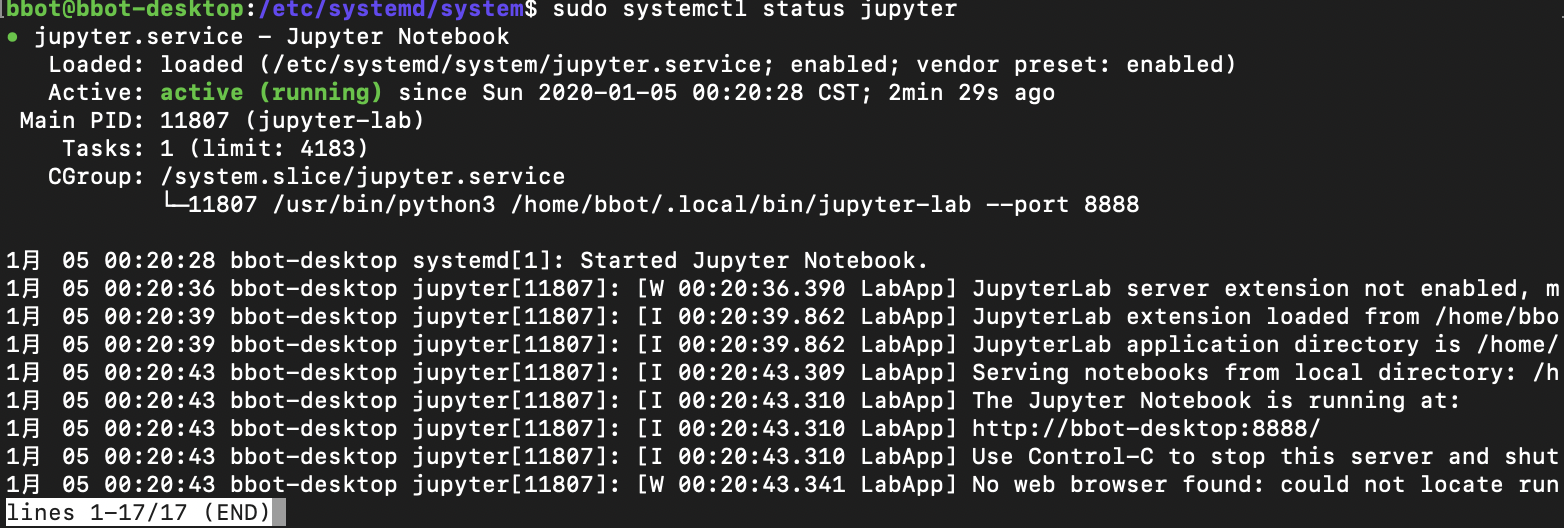
运行以下命令检查服务状态,如果如下图输出,证明服务正常,重启后也能正常启动。
sudo systemctl status jupyter